

Aféierung fir Epson Smart Panel
Epson Smart PanelSeiko Epson Corporation
Gebaut vun Ufank un fir legacy mobil Dréckapplikatiounen wéi Epson iPrint ze ersetzen, Smart Panel stellt eng héich reaktiounsfäeg Benotzererfarung vir. Et benotzt fir direkt Proximitéit Entdeckung a liwwert automatesch Är Wi-Fi Umeldungsinformatiounen un den Drécker ouni manuell Passwuert-Entrée op kleng Drécker Tastaturen ze erfuerderen. Egal ob Dir héichopléisende grenzlos Fotoe vun Ärer Kameraroll dréckt, ënnerschriwwene Kontrakter mat automatescher OCR Verbesserung digitaliséiert, oder Echtzäit Tënttankniveauen iwwer Är EcoTank oder Expression Dréckerflott kontrolléiert, Epson Smart Panel liwwert oniwwertraff Komfort, Beweeglechkeet a Präzisioun.
Schlëssel Fonctiounen vun Epson Smart Panel
Epson Smart Panel integréiert eng expansiv Suite vu Smart Utilities déi d'Benotzer erméiglechen all Aspekt vun der Drécker Hardware ze kontrolléieren:
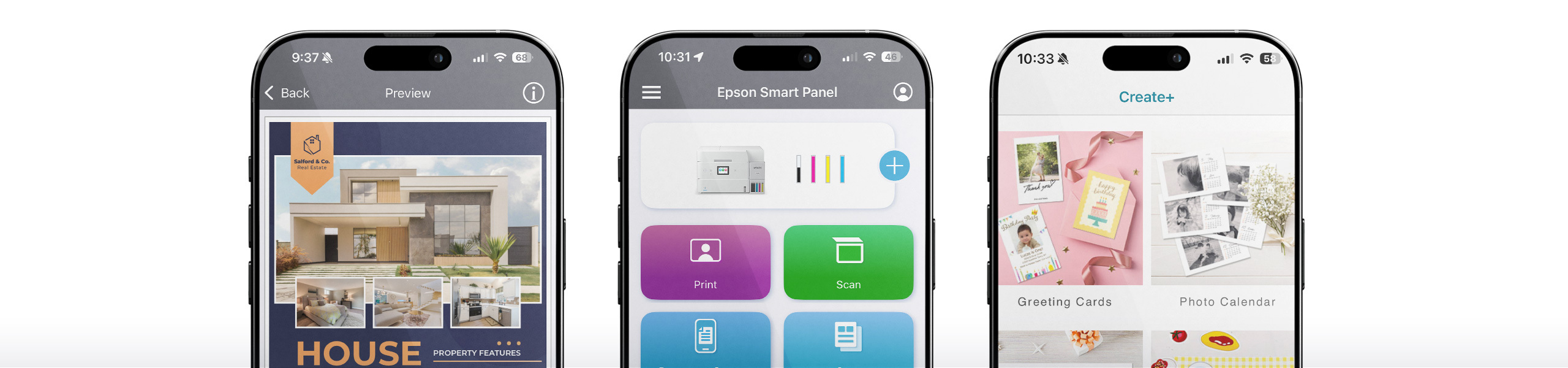
Modular Fliesen-baséiert Interface
Fonctiounen personaliséierbar Dashboard Widgets déi Iech erlaben Är am meeschte benotzt Aktiounen ze prioritär, wéi direkt Foto Dréckerei, Dokument Scannen, oder Preset Copie.
Kamera Dokument Capture
Transforméiert Är Smartphone Kamera an en intelligenten Scanner mat automateschen Dokumentranderkennung, Keystone Verzerrungskorrektioun a Schattentfernung.
Echtzäit Tënt Iwwerwaachung
Visualiséiert de verbleiwen Tëntvolumen mat dynamesche faarwege passenden digitale Gauges. Alarméiert Iech ier eng Aarbecht fällt wéinst entschäerftem Tënt a liwwert eng Klick Ersatzpatroun nei Bestellung.
Direkt Cloud Integratioun
Verbënnt nativ mat Google Drive, Microsoft OneDrive, Dropbox, Box an Evernote. Luet an dréckt Cloud Dokumenter erof oder luet frësch Scans erop ouni d'App ze verloossen.
Ënnerhalt & Diagnostik
Exekutéiert Dréckkopfreinigung, lafen Düsenprüfungsmuster aus, alignéieren Dréckkopf, läscht Pabeierstau Alarmer, an update Drécker Firmware direkt vun Ärem mobilen Apparat.
Erstellt+ Studio & Bastelen
Zougrëff op pre-formatéiert Design Templates fir Fotocollagen, personaliséierte Begréissungskaarten, Business Stationery, CD / DVD Discs, a Line-Art Faarfbuch Konverter.
Virdeeler vun Epson Smart Panel
Am Verglach mat generesche Betribssystem Dréckdialoger (wéi Apple AirPrint oder Standard Android Mopria Treiber) oder eeler legacy Desktop Software, bitt Epson Smart Panel verschidde kompetitiv Virdeeler:
Schlëssel Virdeeler & Virdeeler
- True Hardware Bi-Directional Sync:
- Keen Desktop PC erfuerderlech:
- Null Qualitéitsverloscht:
- 100% Gratis & Sécher:
Considératiounen & Ufuerderunge
- Netzofhängegkeet:
- Hardware Kompatibilitéit:
- Mobile Subsystem op PC:
Wéi benotzt Dir Epson Smart Panel: Schrëtt fir Schrëtt Guide
Follegt dës einfach Schrëtt fir opzestellen an ze drécken mam Epson Smart Panel a Minutten:
Luet d'App erof a lancéiert
Installéiert Epson Smart Panel vum App Store (iOS) oder Google Play Store (Android). Öffnen d'App a gitt néideg lokal Netzwierk, Bluetooth, a Kamera Permissiounen.
Connect op Ären Epson Drécker
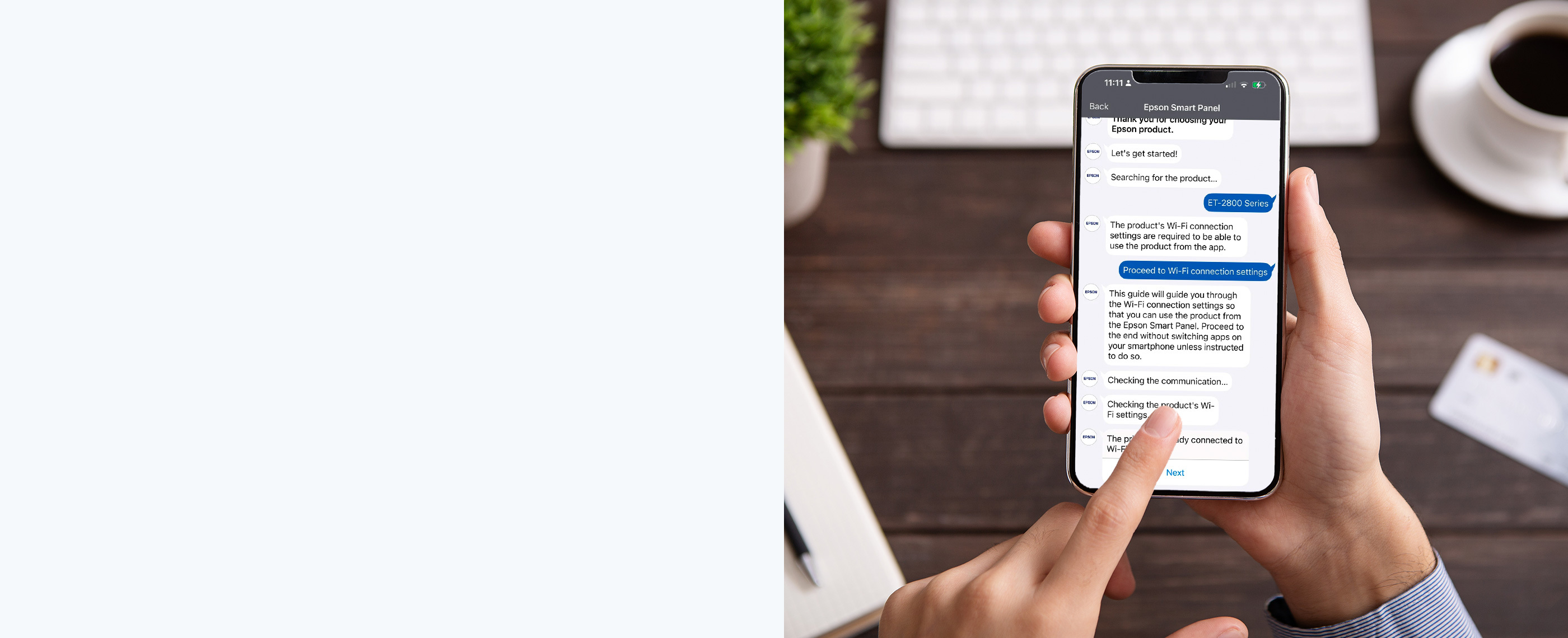
Maacht Äre Drécker un. Tippen op den Knäppchen uewen op der App. Smart Panel entdeckt Ären Drécker automatesch iwwer Bluetooth. Wielt Äert Heem Wi-Fi Netzwierk a loosst d'App d'Verbindungsanmeldungen synchroniséieren.
Entdeckt den Action Dashboard
Den Haaptbildschierm weist Ären Dréckerstatus, Tëntniveauen a Schnellaktiounskaarten. Wielt Är gewënschte Aufgab: , , , oder .
Astellunge konfiguréieren an Drécken
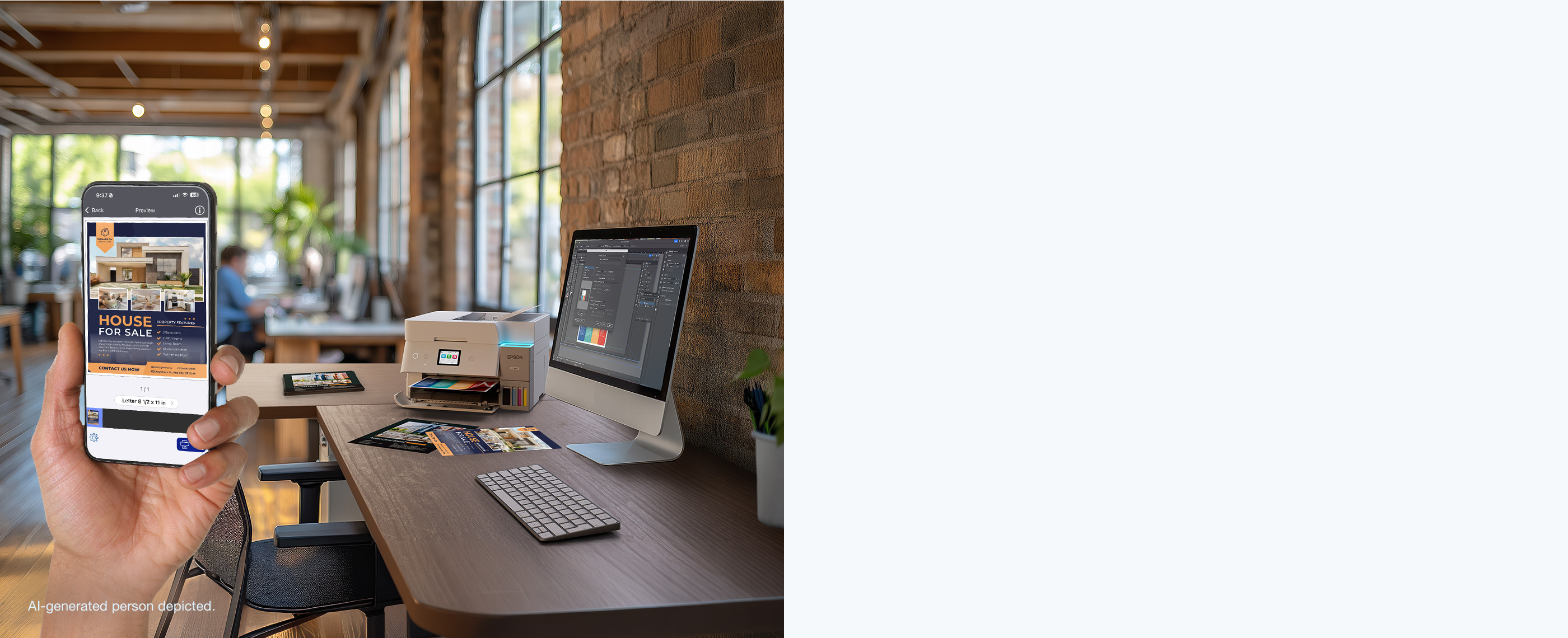
Virschau Äert Dokument oder Foto op dem interaktiven Leinwand. Passt Kopien, Pabeiergréisst, Orientéierung a Faarfmodi un, tippt dann op de prominent bloe Knäppchen.
Wéi installéiere ech Epson Smart Panel
Detailléiert Instruktioune fir den Epson Smart Panel op all Apparater opzestellen:
Installatioun op Apple iOS & iPadOS (iPhone & iPad)
1. Öffnen den Apple App Store op Ärem iPhone oder iPad.
Installatioun op Android (Google Play & Direct APK)
1. Öffnen de Google Play Store, sichen no "Epson Smart Panel", a tippt op .
Installatioun op Windows 11 & Windows 10 PC
1. Fir Windows 11: De Microsoft Store opmaachen, Amazon Appstore installéieren oder de Windows Subsystem fir Android (WSA) aktivéieren an direkt Epson Smart Panel eroflueden.
Installatioun op Apple macOS (Apple Silicon M1/M2/M3/M4 & Intel)
1. Fir Apple Silicon Macs: Öffnen de Mac App Store, sichen no "Epson Smart Panel", klickt op de Tab "iPad & iPhone Apps" an installéiert déi verifizéiert iPadOS Versioun direkt.
Ënnerstëtzend Betribssystemer
Iwwerpréift d'Kompatibilitéitsmatrix hei ënnen fir d'Ënnerstëtzung fir Ären Apparater z'iwwerpréiwen:
| Betribssystem | Versioun Ufuerderung | Konnektivitéit Method | Status |
|---|---|---|---|
| iOS (iPhone) | iOS 15.0 oder méi spéit (inklusiv iOS 17 & iOS 18) | Wi-Fi, Wi-Fi Direct, Bluetooth LE | ✔ Verifizéiert & Native |
| iPadOS (iPad) | iPadOS 15.0 oder méi spéit | Wi-Fi, Wi-Fi Direct, AirPrint Bréck | ✔ Verifizéiert & Native |
| Android Telefonen & Pëllen | Android 9.0 (Pie) bis Android 15+ | Wi-Fi, Wi-Fi Direct, NFC (ausgewielt Modeller) | ✔ Verifizéiert & Native |
| Windows 11 | Build 22000+ (64-Bit & ARM64) | WSA Subsystem / Wi-Fi Network Bréck | ✔ Ënnerstëtzt iwwer Subsystem |
| Windows 10 | 64-Bit & 32-Bit (v1909+) | Android Emulator Bridge / Network IP | ✔ Ënnerstëtzt iwwer Emulator |
| macOS (Apple Silicon M1-M4) | macOS Sonoma, Ventura, Monterey | Native iPadOS App iwwer Mac App Store | ✔ Native App Store |
| macOS (Intel Core) | macOS 10.15 Catalina duerch Sequoia 15 | Epson Desktop Suite / Cloud Bridge | ✔ Ënnerstëtzt iwwer Suite |
Ënnerstëtzend Epson Hardware Apparater
Epson Smart Panel ënnerstëtzt Honnerte vu drahtlose Epson Inkjet Dréckeren a Multi-Funktioun All-in-One Modeller:
Epson EcoTank® Serie
ET-2750, ET-2800, ET-2850, ET-3760, ET-3830, ET-3850, ET-4800, ET-4850, ET-8500, ET-8550 Foto, L1110, L3110, L3110, L3500, L3150 L4260, L5190, L6160, L6190, L805, L850, L1800.
Expression® Home & Premium Serie
XP-2100, XP-2105, XP-2150, XP-3100, XP-3150, XP-4100, XP-4105, XP-5100, XP-6000, XP-6100, XP-7100, XP-8500, XP-8600, XP-85Format0, XP-8500.
WorkForce® & WorkForce Pro Serie
WF-2810, WF-2830, WF-2850, WF-2870, WF-3820, WF-4820, WF-4830, WF-7820, WF-7840 Wide Format, WF-C5290, WF-C57020, EC-4000, EC-40.
SureColor® & Dokument Scanner
SC-P700, SC-P900 13-Zoll a 17-Zoll Professionelle Fotoprinter, DS-530, DS-575W, DS-730N, ES-400, ES-500W II, ES-580W Dokumentscanner.
Technesch Spezifikatioune & Wireless Protokoller
The Epson Smart Panel architecture leverages hardware-level bidirectional polling and modern transport security. Below are the verified technical parameters for wireless connectivity, media handling, and cryptographic verification:
| Spezifizéierung Parameter | Technesch Ëmsetzung Standard | Benotzer Benefice & Hardware Kapazitéit |
|---|---|---|
| Wireless Transport Protocol | Wi-Fi 802.11 b/g/n (2.4 GHz), Wi-Fi Direct P2P, Bluetooth 4.2 / 5.0 LE | Direkt Null-Configuratioun Apparat Entdeckung an router-gratis Dréckerei an off-grid Ëmfeld. |
| Transport Layer Security (TLS) | TLS 1.3 / AES-256 Bit End-to-End Encryption via Epson Connect | Garantéiert Dréckjobs, déi iwwer Cellulär Daten oder Fernnetzwierker geschéckt ginn, si vu Paketschnooping geschützt. |
| Optesch Scannen Opléisungen | 300 DPI (Standard Text), 600 DPI (Faarf Grafiken), 1200 DPI (Archivfoto) | Voll onkompriméiert TIFF, Multi-Page PDF, a JPEG Exporter mat integréierter OCR Texterkennung. |
| Cloud Synchroniséierung Endpunkte | Google Drive, Dropbox, Microsoft OneDrive, Box, Evernote, Apple iCloud | Direkt 1-Tap Scan Liwwerung direkt an bevorzugt Cloud Repositories ouni Zwëschenlagerung. |
| Voice Assistant Protokoller | Apple Siri Shortcuts (iOS 14+), Google Assistant Voice Intents (Android 8+) | Handfräi Gesangdruck fir alldeeglech Agendaen, Fotocollagen, gezeechent Pabeier, an Epicerielëschten. |
Technesch Editorial Iwwerpréiwung & Sécherheetsverifikatioun
All links, guides, and download instructions on epsonsmartpanel.org undergo strict verification against official Seiko Epson Corporation engineering release notes and VirusTotal cryptographic hash databases (SHA-256). We test wireless pairing across iOS, Android, Windows Subsystem for Android, and Apple Silicon macOS to deliver 100% accurate, lab-verified tutorials.
Oft gestallte Froen (FAQ)
Fannt Äntwerten op déi 15 meescht üblech Froen iwwer Epson Smart Panel Features, Setup, an Troubleshooting:
Yes. Epson Smart Panel supports Siri Shortcuts on iOS and Google Assistant on Android. You can configure voice triggers such as 'Hey Siri, print my daily schedule' or 'Hey Google, print lined paper' to execute frequent print jobs hands-free without opening the application.
Wann e Pabeierstau oder Hardwarefehler geschitt, weist Smart Panel en animéierten Schrëtt-fir-Schrëtt Resolutiounsdiagramm deen déi exakt Schacht oder hënneschter Cover weist fir opzemaachen. Soubal Dir dat gestoppt Blat sécher läscht an de Cover zoumaacht, tippt op 'Resume Print' an der App fir d'Aarbecht weiderzemaachen ouni Tënt ze verschwenden.
Yes. Any number of mobile devices on your home or office Wi-Fi network can install Epson Smart Panel and link to the printer. The printer's internal print queue manages simultaneous print jobs sequentially, while real-time ink telemetry is broadcast to all connected devices.
Horizontal Banding weist op verstoppte Printheaddüsen. Vum Smart Panel Dashboard, tippt op den 'Maintenance' Fliesen, wielt 'Print Head Nozzle Check', a kontrolléiert dat gedréckt Testmuster. Wann d'Linnen gebrach sinn, wielt 'Kappreinigung' vun der App. Widderhuelen wann néideg bis d'Muster kontinuéierlech ass.
Yes. When you use Epson Connect remote printing outside your home Wi-Fi network, the print payload is transmitted using enterprise-grade TLS 1.3 encryption directly to Epson's secure cloud servers before reaching your printer. Print data is processed ephemerally and automatically purged after delivery.
Versioun Geschicht & Changelog
Verfollegt rezent Verbesserungen, Optimisatiounen an nei Hardware Kompatibilitéit Ergänzunge iwwer grouss Verëffentlechungen:
• Enhanced Wi-Fi 6 mesh router handshake speeds and improved Bluetooth LE auto-discovery.
• Optimized Camera Document Capture OCR engine with 35% faster edge detection.
• Full compatibility verification for iOS 18, iPadOS 18, and Android 15.
• Added direct integration with Microsoft OneDrive for Business and Google Drive shortcuts.
• Fixed printhead alignment wizard rendering issues on high-DPI smartphone displays.
• Enhanced real-time ink gauge accuracy for 6-color EcoTank Photo printers.
• Improved background multi-page PDF generation performance.
• Introduced zero-touch guided Bluetooth pairing.
Problembehandlung gemeinsam Epson Smart Panel Problemer
Benotzt dës Expert diagnostesch Léisunge fir allgemeng Feeler ze léisen:
Problem 1: "Drécker net fonnt" wärend der initialer Wi-Fi-Setup
Léisung:
Problem 2: Drécker weist "Offline" oder akzeptéiert net Drécken Jobs
Léisung:
Problem 3: Camera Document Capture produzéiert onschëlleg oder verzerrte Scans
Léisung:
Problem 4: Tëntniveauen feelen um Dashboard ze aktualiséieren
Léisung:
Problem 5: Firmware Update Stänn oder klappt hallef
Léisung:
Expert Tutorials & Troubleshooting Guides
Entdeckt eisen technesche Wëssenshub fir Schrëtt-fir-Schrëtt Diagnostik, Konnektivitéitsfixen, a fortgeschratt Drocktutorials:
 Setup Guide
How to Connect Epson Smart Panel to Wi-Fi
Schrëtt-fir-Schrëtt Wireless a Wi-Fi Direct Pairing fir EcoTank an WorkForce Dréckeren.
Read Tutorial → Troubleshooting
Fix "Printer Not Found" & Offline Feeler
Léisung Router Band Mëssverständnis, DHCP Lease Ännerungen, a mobil Entdeckung Drëpsen.
Read Tutorial → Comparison
Smart Panel vs. iPrint: Upgrade Guide
Architektonesch Differenzen, UI Sprong, an Dréckermodell Kompatibilitéitsmatrix.
Read Tutorial →